
The "i" is gone from iPhoto. In its place comes Photos,
a sleeker, more advanced way to manage your images. The app, free and
available today in a software update, gives Apple's basic photo program
some of the advanced features found in the soon-to-be-defunct Aperture,
but in a new, pared-down interface.
1. Store photos in the iCloud Photo Library
This
is arguably the most important part of Photos. Photo Stream, Apple's
old cloud storage system, limited you to 1000 photos in the cloud. With
the new Photos, you're limited only by your available capacity in the
new iCloud Photo Library (which you'll have to enable manually in the
Photos & Camera setting on your phone). That's good news in a way,
but also bad news if you're hesitant to drop more money on yet another
cloud storage plan.
The
new Photo Library has some perks that might make it worth it: Videos
are now synced too, and, like photos, are available across devices. If
you delete a photo from one device, it's gone from all devices but
retrievable from the cloud for a month. The full-quality high-resolution
version of both types of file are stored in the cloud, with smaller
versions left on your devices, leaving more open space on your gadgets.
More From
Popular Mechanics
2. Enhance photos according to Apple's algorithms
Like
Aperture, Photos has several auto-adjustments that are quick and, for
the most part, accurate. Auto-crop, for instance, finds the horizon in
the photo, makes it level, and then crops the image according to the
rule of thirds.
3. Revert to original
Photos
gets one of the best Aperture features: the ability to revert a photo
to its unadjusted, original state. Just hit the "m" key or click the
"revert to original" button and all your changes are gone. If you decide
to stick with changes, the new version will show up on all your
devices.
4. Aperture is gone
Since
last fall, there have been no updates to Aperture. Now it's no longer
available in the App Store. You can keep using it, but it won't work
with the iCloud Photo Library, and eventually you're probably going to
be forced to switch. That leaves you with two options: Photos or Adobe
Lightroom. Both programs have tools that make migrating your library
easy. Photos is better if you don't want to spend any money, but the
money you spend ($10 per month) gets you far more features in Lightroom.
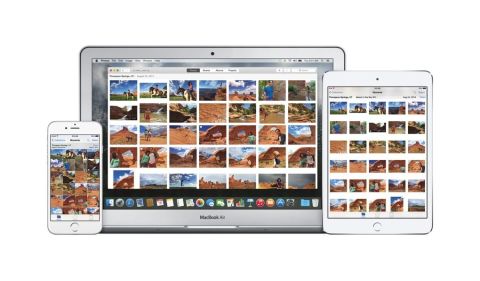
5. Nothing changes on iOS devices
Apple's
latest updates to desktop programs have tended to make them look and
work more like their iOS counterparts. Photos is no different. You'll
find the same somewhat bizarre thumbnail-browsing view on your computer
that you have on your phone, for instance, as well as other ways to
browse photo (on a map, for instance). You'll also find many of the same
icons and the same pleasantly clean interface.
Tag :
iPhone

0 Komentar untuk "5 Things You Need to Know About Apple's New Photos App"